
VIP.net is Sunsetting.
Your Practice Deserves
a Worthy Successor.
Most ophthalmology practices thinking about life after VIP.net are quietly worried about the same thing: the clinical screen they've spent years tuning, and whether they'll have to start again from scratch. You won't.
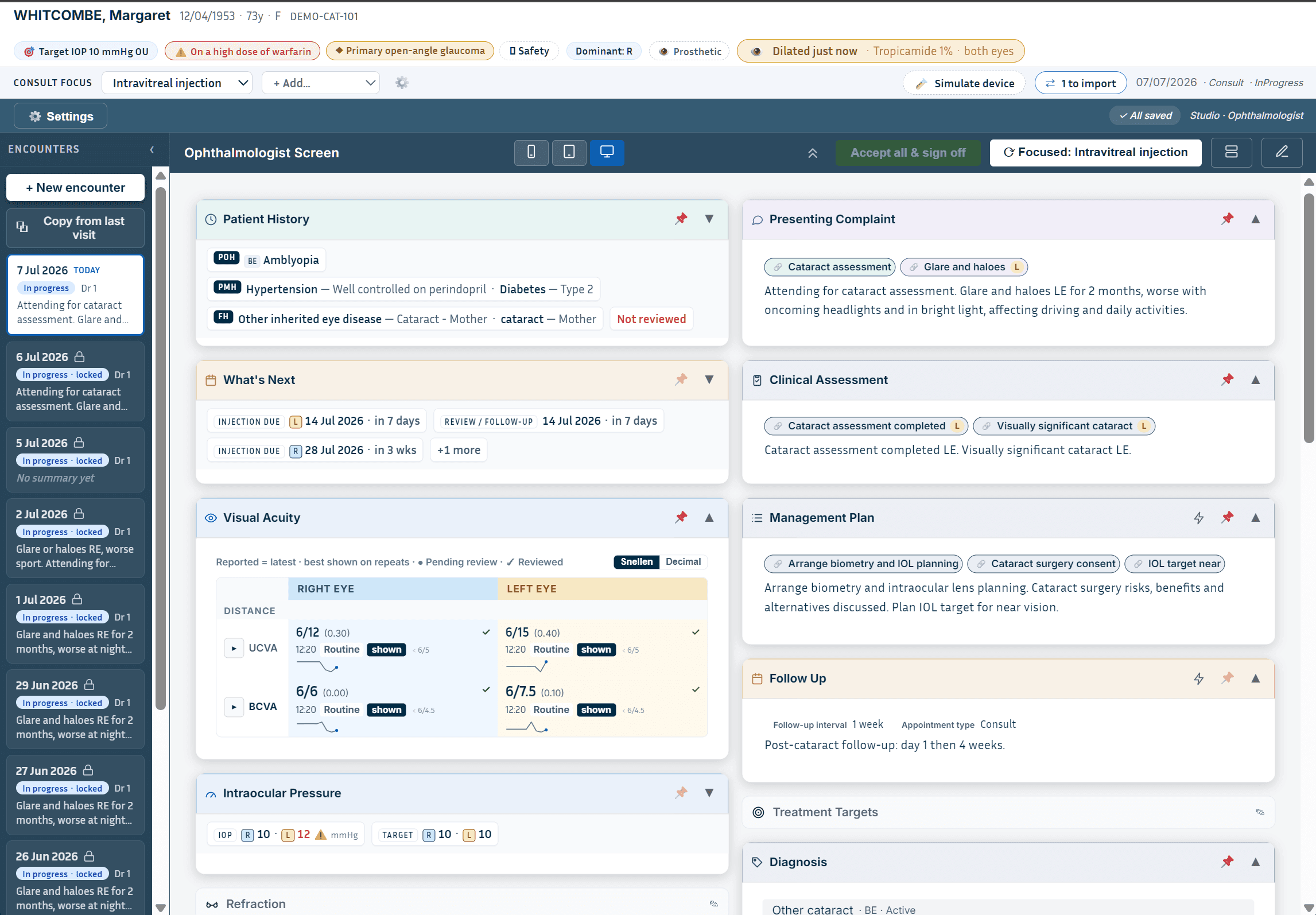
MedNext is a fully browser-native, paperless-by-design platform built ground-up for Australian and New Zealand ophthalmology. The screen is yours, drag-and-drop cards, hide what you don't use, and every measurement becomes a coded clinical fact that flows straight into your notes, letters and billing, no re-keying, no drift.
The Timeline
Start Evaluating Now
Migration takes 6–12 months for a specialist practice. Practices that wait until 2027 risk a rushed, high-pressure transition.
Maintenance Mode Begins
Best Practice stops all VIP.net development. Only critical security updates and fee schedule releases will continue.
Full End of Life
No support, no security patches. Hosted environments decommissioned. All Medicare, DVA, and PRODA integrations cease permanently.
For VIP.net Ophthalmology Users
The Next Generation of Ophthalmology Software
VIP.net pioneered ophthalmology-specific workflows for Australian eye specialists. MedNext takes that concept further.
Our ophthalmology solution is built directly into Clinical and gives doctors and technicians the ability to create their own dashboards using drag-and-drop components, designed around the way they work.
- Your layout, your workflow, keep only the fields you use
- Separate, combined, or mixed Ophthalmologist + Technician screens
- Measurements from your tech flow straight into notes and letters, zero re-keying
- Built-in Cataract, Glaucoma, Intravitreal, Post-op and Diabetic workflows
- Built specifically for Australian ophthalmologists
Why Ophthalmologists Are Moving to MedNext
Personalised Clinical Dashboards
Drag and drop cards to match your workflow. Remove any fields you don't use, you see only what matters to you.
Flexible Screen Layouts
Create separate Ophthalmologist and Technician screens, or a single combined layout and keep more than one version.
Structured Coded Data
Every entry is a coded clinical fact that drives your note, your GP letter, MBS billing, and registry all from one click.
"/" Shortcuts Built In
A comprehensive library of "/" commands for data capture and letter generation. Add your own in seconds.
Capture Once, Use Everywhere
IOP, VA, refraction and other measurements entered by your tech or imported from a device which flow straight into your notes and letters.
Consult Type Workflows
Select Cataract, Glaucoma, Intravitreal, Post-op Review or Diabetic at the start of each consult or multiple when the patient has more than one problem.
Ophthalmology Built Around Your Workflow
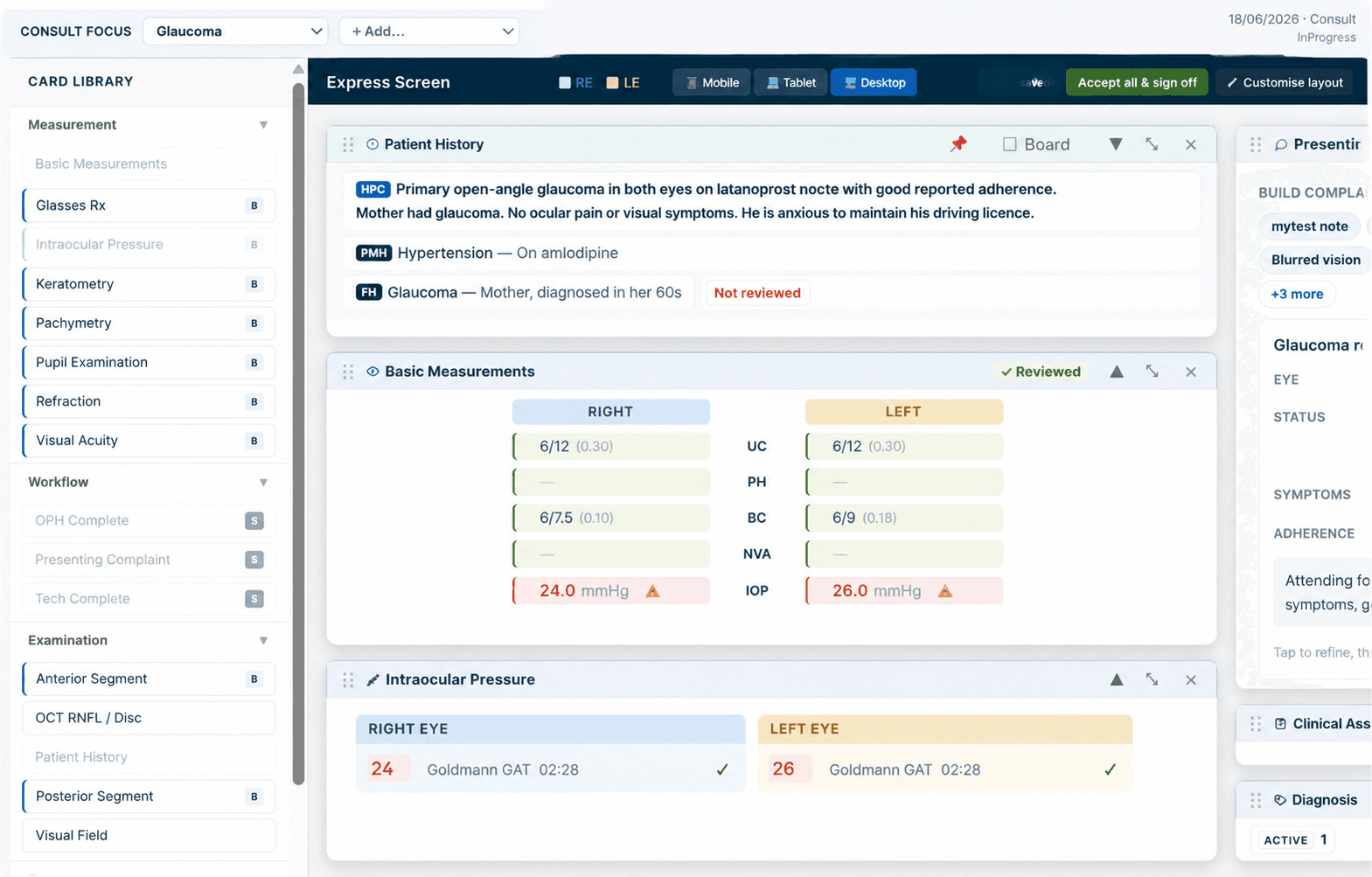
One Dashboard Does Not Fit Every Specialist
Every ophthalmologist works differently. MedNext lets you design the screen exactly the way you want from drag and drop self-contained cards, remove any fields you don't use, and keep more than one layout for different consult types or team members.
At the start of each consult, select the workflow that fits for Cataract, Glaucoma, Intravitreal, Post-op Review, or Diabetic. The right fields and "/" shortcuts come to the front automatically, but everything else stays accessible when you need it.
Measurements entered by your technician or imported from a device flow straight into your notes and letters without a single keystroke of re-entry.
Built-in "/" shortcuts for data capture and letter generation, you can add your own in seconds.
Inside the Screen
The Small Details Most EMRs Never Get Right
Real cards from a real ophthalmology consult, built on coded clinical facts, not free text.
Every consult opens with the full safety picture
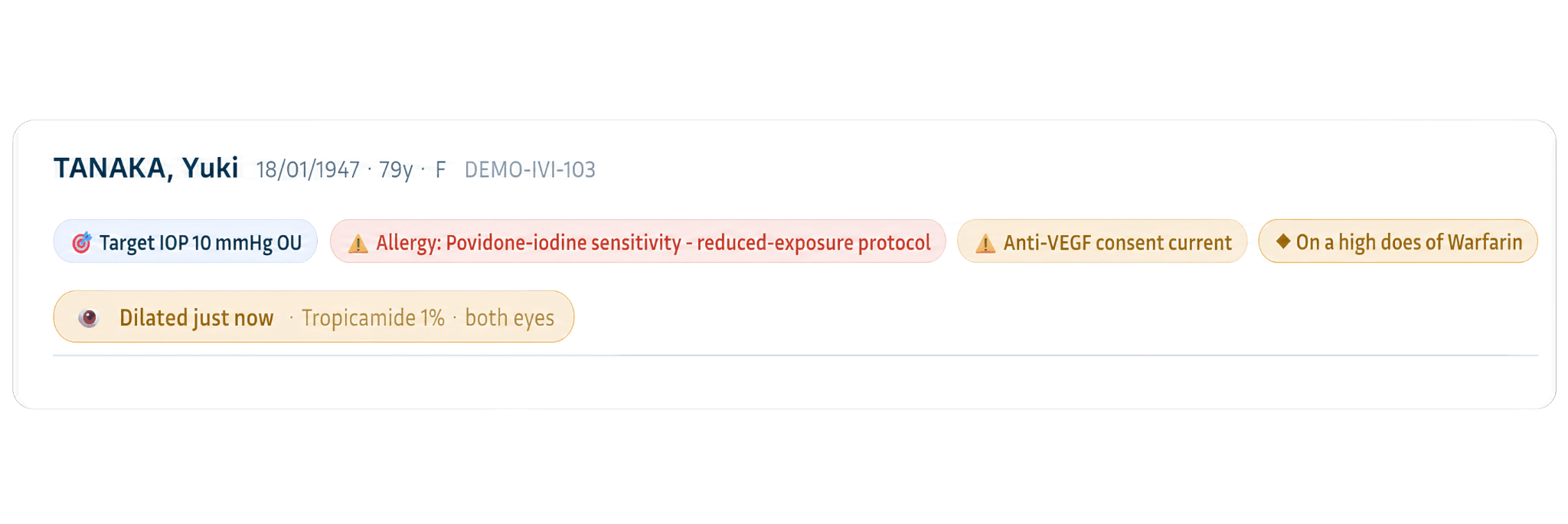
Target IOP, allergy alerts, consent status, anticoagulant flags and dilation timing sit above every consult, not buried in a tab you have to remember to check.
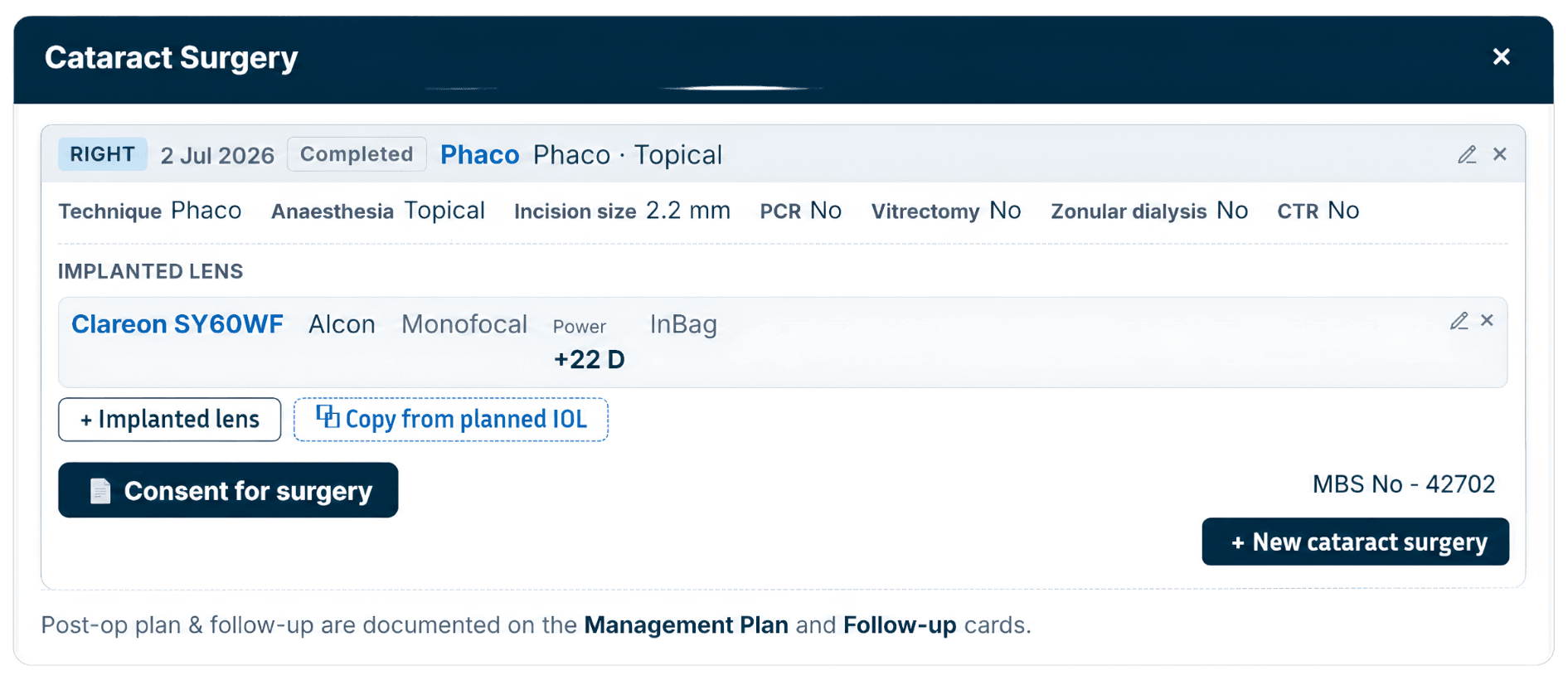
Procedures, Captured as Structured Fact
Technique, incision size, anaesthesia and the implanted lens model, power and placement are entered once as coded fields, not a paragraph of free text, so the same detail is ready for the note, the letter and MBS billing.
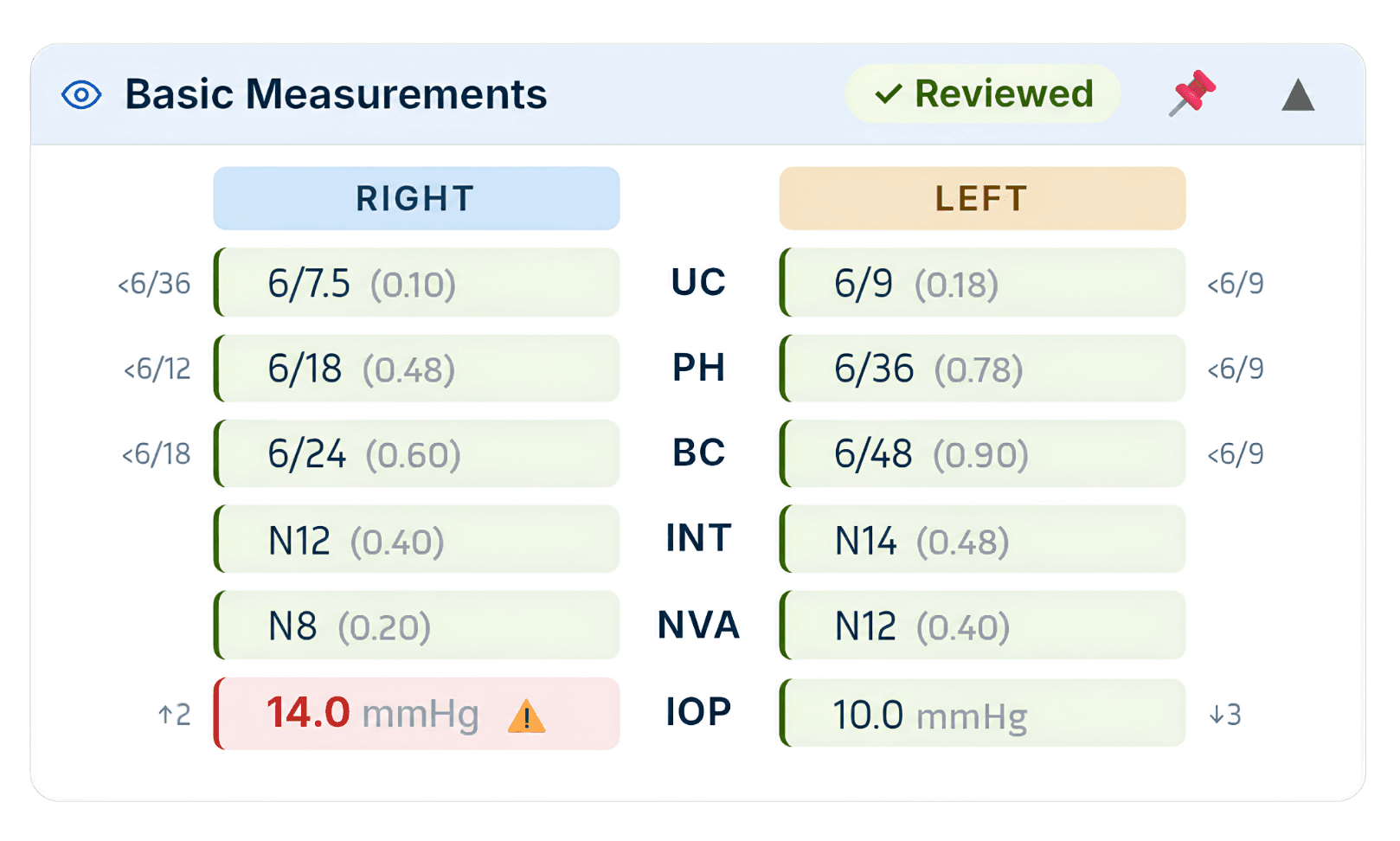
Every Number Checked Against Target
VA and IOP for both eyes, colour-coded and trended the moment they're entered, so an out-of-range pressure is impossible to miss.
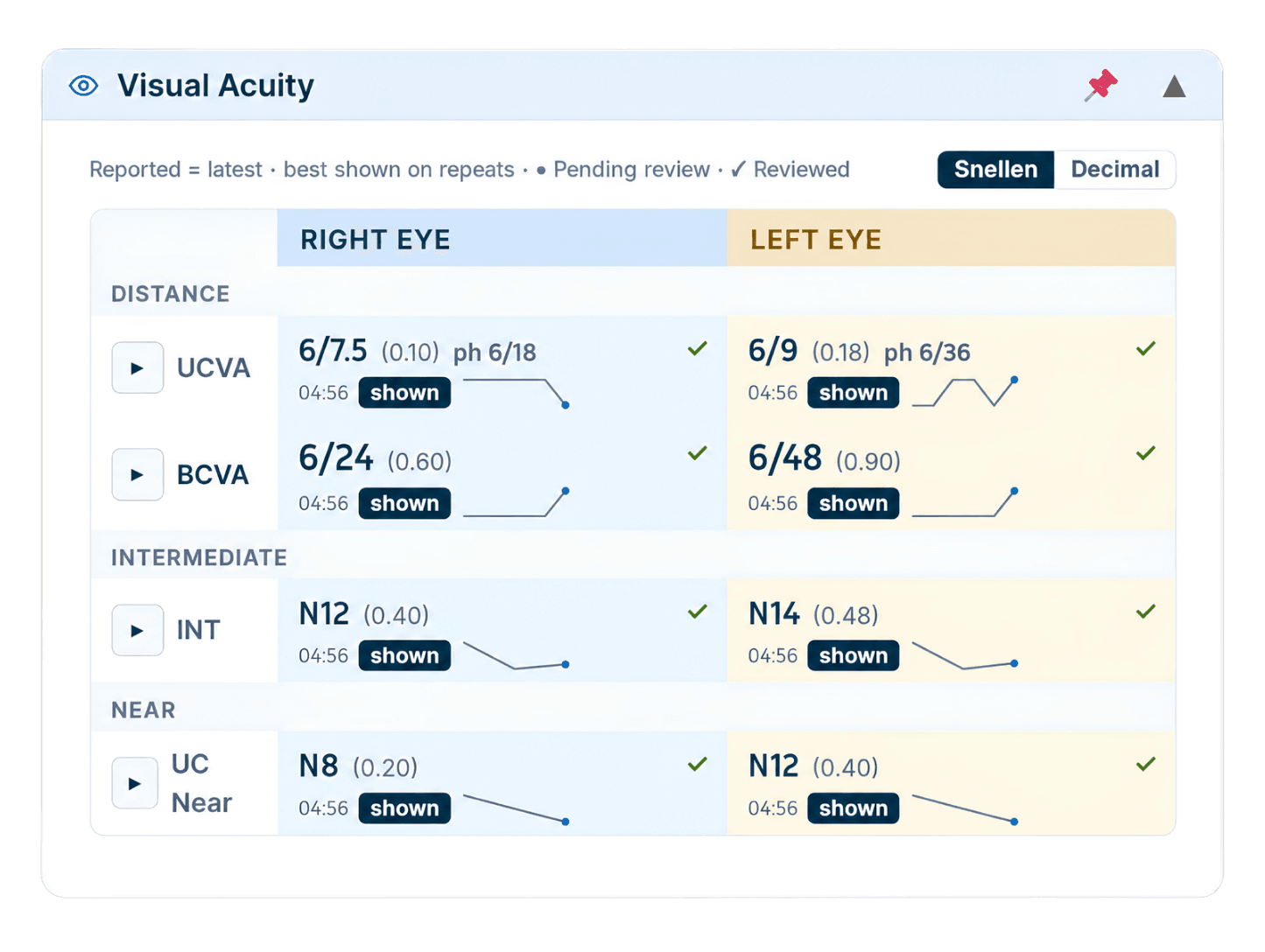
Visual Acuity, Charted Automatically
Distance, intermediate and near, per eye, in Snellen or decimal, with a trend line built from prior visits and no separate charting step.
Bp VIP.net → MedNext
Everything You Valued, Carried Forward
“Can it really do everything VIP.net did?” is the right question to ask. Here's the honest, line-by-line answer.
You valued
A customisable clinical screen you could shape to your workflow
MedNext today
You design the screen yourself: drag-and-drop, self-contained cards, hide unused fields, multiple saved layouts (tech / ophthalmologist / combined)
What's new
The screen is card-based and fully self-contained, so personalising it never touches the underlying data schema
You valued
Familiar day-to-day consult flow
MedNext today
Ophthalmology-native workflows built in: Cataract, Glaucoma, Intravitreal Injection, Post-op, Diabetic Review
What's new
Stack multiple Consult Types in a single consult for multi-problem patients; relevant fields and shortcuts auto-prioritise
You valued
Shortcuts and phrases to speed up notes and letters
MedNext today
A comprehensive "/" command library for both data capture and letter generation
What's new
Build your own "/" commands in seconds, your library grows with you
You valued
Clinical notes and referrer / GP letters
MedNext today
Notes and letters generated from the same clinical data
What's new
Capture once, use everywhere: a value entered once appears as the actual value in note, letter and billing, no re-keying, no drift
You valued
Recording clinical measurements (IOP, VA, refraction)
MedNext today
All captured, by tech or device import
What's new
Every entry is a coded clinical fact, not free text, so one click drives the note, the letter (with laterality), and the MBS item, registry and audit-ready
You valued
Editing letters
MedNext today
Full letter editing
What's new
Edit a data point inside a letter and the underlying record updates with it, validated and secure, both directions live
You valued
An EMR you could rely on for the long term
MedNext today
A platform built ground-up for AU/NZ ophthalmology, with local support
What's new
Purpose-built for the specialty rather than a general EMR with an eye module added on
Have a specific feature in mind? Tell us what you rely on today and we'll show you exactly how it works in MedNext.
Your Migration Roadmap
A structured, six-step transition which is planned, configured, and signed off before you go live.
Map Your Current Setup Easily
Document your user-defined fields, letter templates, image archives, and billing workflows. VIP.net's deep configurability means every practice is different, we start by understanding yours before a single piece of data moves.
Request Your Data Extract
Work with your IT provider to generate a .bak SQL Server backup of your VIP.net database, plus a separate archive of any images or letters stored outside the database. Best Practice provides guidance on this process, we help you through every step.
Configure MedNext for Your Practice
Our team maps your VIP.net workflows into MedNext clinical templates, appointment types, billing codes, referral pathways, and custom fields. Your system is configured and validated before anyone trains on it.
Migrate and Validate Your Data
We convert your patient demographics, full clinical notes history, appointments, medications, allergies, read-only billing history, and user-defined field data. You verify completeness and accuracy before you go live, no surprises on day one.
Train Your Team, Run in Parallel
Staff training happens inside your configured MedNext environment, not a generic demo system. Keep VIP.net accessible as a read-only reference for the first few weeks after go-live, we recommend this for every migration.
Go Live with Dedicated Support
Your named account manager is available on go-live day and the weeks that follow. Not a support ticket queue, a person who knows your practice, your speciality, and your team by name.
Map Your Current Setup Easily
Document your user-defined fields, letter templates, image archives, and billing workflows. VIP.net's deep configurability means every practice is different, we start by understanding yours before a single piece of data moves.
Request Your Data Extract
Work with your IT provider to generate a .bak SQL Server backup of your VIP.net database, plus a separate archive of any images or letters stored outside the database. Best Practice provides guidance on this process, we help you through every step.
Configure MedNext for Your Practice
Our team maps your VIP.net workflows into MedNext clinical templates, appointment types, billing codes, referral pathways, and custom fields. Your system is configured and validated before anyone trains on it.
Migrate and Validate Your Data
We convert your patient demographics, full clinical notes history, appointments, medications, allergies, read-only billing history, and user-defined field data. You verify completeness and accuracy before you go live, no surprises on day one.
Train Your Team, Run in Parallel
Staff training happens inside your configured MedNext environment, not a generic demo system. Keep VIP.net accessible as a read-only reference for the first few weeks after go-live, we recommend this for every migration.
Go Live with Dedicated Support
Your named account manager is available on go-live day and the weeks that follow. Not a support ticket queue, a person who knows your practice, your speciality, and your team by name.
Ready to Move Beyond VIP.net?
MedNext combines the ophthalmology-specific functionality that VIP.net users value with a modern cloud-based platform built for the future of healthcare.